Jabra Enhance Select
GN Consumer Hearing Corporation
Also known as Jabra Enhance Select App
Adjust the sound of Jabra Enhance Select hearing aids, set up M Series aids yourself, or request new settings from Jabra if your purchase includes audiology care.
What Jabra Enhance Select does
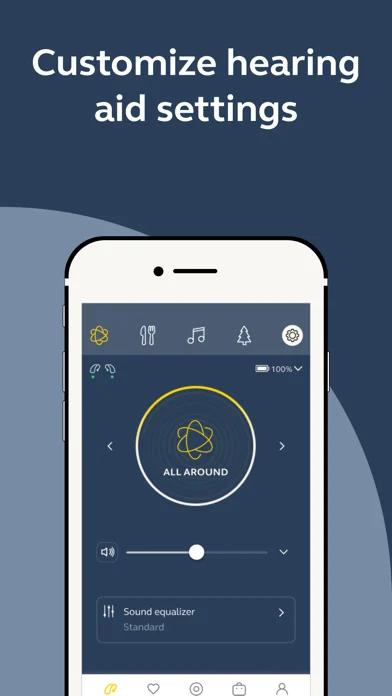
Jabra Enhance Select turns your phone into a remote for your Enhance Select hearing aids. Switch to Restaurant for a conversation over dinner, adjust each ear separately, or save a bass, middle and treble mix you like. If you wear M1, M2 or M3 aids, you can take the self-tuning test and apply your settings at home. If your purchase includes audiology care, describe what sounds wrong in the app. When your hearing specialist sends new settings, you can download them to your aids.
How it compares
The Jabra app depends on your hearing aids
Enhance Select 700 and M Series owners use Jabra Enhance Select for sound adjustments. If you wear Jabra Enhance Pro 30 hearing aids, Jabra directs you to the Jabra Enhance Pro app.
Remote adjustments you can install later
With Jabra audiology care, you can describe a listening problem and download new settings when your specialist sends them. With myPhonak, your clinician can adjust compatible Phonak aids during a scheduled call.
Features
Listening assistance
- Supported: Separate ear adjustments
- Supported: Audio equalizer
Device companion
- Supported: Hearing-device control
- Supported: Listening-program selection
- Supported: Hearing-device volume
- Supported: Device battery status
- Conditional: Find a hearing device2
- Conditional: Remote professional support3
- Conditional: Remote fitting adjustments4
- Conditional: Personalized hearing programs5
- Conditional: Hands-free calls8
- Conditional: Device firmware updates9
- Supported: Hearing device care guides
- Supported: Hearing device control signalbluetooth
- Supported: Hearing device maintenance reminders
- Conditional: Hearing aid self-fitting10
- Conditional: Remote fitting workflow11clinician sent settings
- Supported: Contact customer support
- Supported: Hearing aid connection status
- Supported: Listening preset previews
- Conditional: Hearing care appointment booking12
- Conditional: Hearing aid tap control settings13
- Supported: Hearing care account toolsorder suppliesiPhone only
Compatibility
- Supported: Required hardwareJabra Enhance Select 50 · Jabra Enhance Select 50R · Jabra Enhance Select 50R Rx · Jabra Enhance Select 100 · Jabra Enhance Select 100 Rx · Jabra Enhance Select 200 · Jabra Enhance Select 200 Rx · Jabra Enhance Select 300 · Jabra Enhance Select 500 · Jabra Enhance Select 700 · Jabra Enhance Select 50 · Jabra Enhance Select 50R · Jabra Enhance Select 50R Rx · Jabra Enhance Select 100 · Jabra Enhance Select 200 · Jabra Enhance Select 200 Rx · Jabra Enhance Select 300 · Jabra Enhance Select 500 · Jabra Enhance Select 700 · Jabra Enhance Select M1 · Jabra Enhance Select M2 · Jabra Enhance Select M3
Availability & access
- Supported: Account requirementRequired
- Conditional: Ongoing free core functionality1
- Supported: Hearing device required
- Supported: Internet required
Privacy & data
- Supported: Text sent off device
- The controls are free to use after obtaining compatible hearing aids.
- The Select 700 manual lists a finder. Jabra does not specify its range or location method in this guide.
- Available to purchasers with audiology care. The Care tab offers booking for a Zoom appointment.
- Requires access to Jabra audiology care. Request a change, then download the new settings when ready.
- One user-defined equalizer filter can be saved. Choosing Reset clears it.
- Select 700 supports direct streaming from compatible Apple devices.
- For the Select 700 route documented here, the phone needs Android 10 or later and Android Streaming for Hearing Aids (ASHA).
- Requires a phone that supports hands-free calling with that hearing aid. The hearing aid microphones carry the outgoing voice.
- The Select 700 guide describes online updates with internet and the aids connected nearby.
- M1, M2 and M3 owners can take or repeat the self-tuning test and apply the result.
- Jabra’s Audiology Team sends the requested adjustment to eligible customers.
- Requires access to Jabra’s audiology services. Video visits take place via Zoom.
- On M3, 700 and 500 with a compatible phone, toggle double-tap answering in Advanced hearing aid settings.
App Store ratings & reviews
Praise
- iPhone users describe changing volume or sound settings easily. Two reviewers describe requesting and receiving adjustments from home.
Complaints
- iPhone reviewers report having to reconnect one or both aids, sometimes restarting the phone or reinstalling the app.
- Some iPhone users say a sign-in prompt kept them from changing settings where they had no internet connection.
Mixed reports
- Some iPhone users like setting the volume separately but say they have to restore their preferred balance after charging.
Google Play ratings & reviews
Praise
- Android users describe switching sound programs, adjusting each ear and installing settings sent by a professional.
Complaints
- Android reviewers describe being asked to sign in again when opening the controls. Some say they could not adjust volume while offline.
- Some Android users report having to set their preferred volume balance again after returning the aids to their case.
Mixed reports
- Some Android users describe repeated pairing attempts or one aid dropping out. Others say pairing improved after changing phones or updating software.
Hearing devices
Includes documented compatible products and models linked in our catalog. Features can depend on your model, phone and firmware; check the compatibility information for any restrictions.
11 models & families
- Jabra Enhance Select 100AndroidCompatibility information
- Jabra Enhance Select 100 Rx
- Jabra Enhance Select 200AndroidCompatibility information
- Jabra Enhance Select 200 RxAndroidCompatibility information
- Jabra Enhance Select 300AndroidCompatibility information
- Jabra Enhance Select 50AndroidCompatibility information
- Jabra Enhance Select 500AndroidCompatibility information
- Jabra Enhance Select 50RAndroidCompatibility information
- Jabra Enhance Select 50R RxAndroidCompatibility information
- Jabra Enhance Select 700AndroidCompatibility information
- Jabra Enhance Select M SeriesiPhone · AndroidCompatibility information