App directory
Philips HearLink 2 app
SBO Hearing AS
Controls Philips HearLink hearing aids: volume, programs, a lost-aid finder, remote adjustments and Apple Watch control.
Features
Audio input & output
- Conditional: Live outputs13Hearing device audio
Device companion
- Conditional: Hearing-device tinnitus controls17
- Conditional: Hearing-device control18
- Conditional: Find a hearing device19
- Conditional: Remote professional support18
- Conditional: Remote fitting adjustments18
- Conditional: Device-usage tracking20
- Conditional: Media streaming21
- Conditional: Microphone streaming22iPhone · iPad only
- Conditional: Auracast assistant23
- Conditional: Accessory control18
- Conditional: Device firmware updates24
- Conditional: Watch-based device control18Apple Watch only
Compatibility
- Supported: Required hardware25Compatible Philips HearLink hearing aids with Bluetooth Low Energy
Availability & access
Privacy & data
- Core hearing-aid control works without an account; an account is needed for some features such as Remote Fitting. Evidence: Create account or sign in, p.33.
- Applies to the Remote Fitting workflow only: the visit is arranged with the user's hearing care professional, who must hold the licence for the feature. Evidence: IMPORTANT NOTICES, p.8.
- Only for Remote Fitting visits, which are booked with and run by the user's hearing care professional; everyday controls do not need provider enrollment documented. Evidence: Begin visit, p.37.
- Required for the Remote Fitting feature (recommended minimum 1 Mbps upload/download); not documented as required for local hearing-aid control. Evidence: System requirements, p.9.
- Find my Hearing Aids location data is stored only on the phone/tablet; Hearing Health Statistics are also stored locally.
- Remote Fitting audio and video are live streamed and not recorded or kept after the session. Session technical data is kept 90 days; other session data up to 24 hours if interrupted.
- Only during a Remote Fitting video visit, where audio and video are streamed between the user and their hearing care professional.
- Only for chat messages exchanged with the hearing care professional during a Remote Fitting session; kept only during the session (up to 24 hours if interrupted).
- By request to Demant (privacy@demant.com; US users USPrivacy@Demant.com) under GDPR or applicable US state rights; no in-app export documented.
- Remote microphone uses the iPhone or iPad microphone and streams to compatible paired hearing aids; documented as iPhone/iPad only and not available on Tinnitus, AudioClip or TV Adapter programs. Evidence: Remote microphone, p.23.
- Requires a Philips AudioClip paired to the hearing aids; the app activates its RemoteMic program. Evidence: Accessories and your app, p.17.
- Auracast broadcasts only on compatible hearing aids (store listing: Philips HearLink 60 and 50 models) with an available broadcast. Evidence: Auracast broadcast, p.24.
- Output is to compatible paired Philips HearLink hearing aids; source availability varies by hearing-aid model and phone. Evidence: Remote microphone, p.23.
- Requires compatible hearing devices and a supported phone. Functions vary with model, firmware and professional configuration.
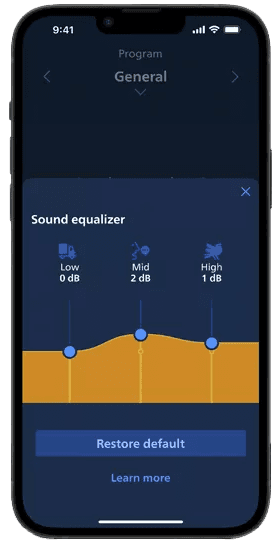
- Streaming equalizer (TV Adapter, AudioClip and phone streaming) is listed for all models except Philips HearLink 00 and not on Tinnitus programs; the surroundings sound equalizer is for HearLink 60, 50 and 40 models. Feature availability varies by hearing-aid model and firmware per the IFU Features compatibility table (Philips HearLink XX60, XX50, XX40, XX30, 9010/7010/5010, 3010/2010, XX20). Evidence: Streaming equalizer, p.21.
- Requires supported Apple Watch, paired compatible iPhone and hearing devices. Other phone-app features are not established on the watch.
- Only when the hearing care professional has activated Tinnitus SoundSupport in the hearing aids; Comfort pulse availability varies by model. Evidence: Intended use of Tinnitus SoundSupport, p.42.
- HearLink 2 1.8: follow model/firmware matrix on pages 10–11. Auracast and remote services vary by device; Apple Watch requires paired iPhone. Platform-specific contexts must be separated before import.
- HearLink 2 1.8: follow model/firmware matrix on pages 10–11. Auracast and remote services vary by device; Apple Watch requires paired iPhone. Platform-specific contexts must be separated before import. Location permissions and a previous connection may be required; last-known location is not live GPS in the hearing aid.
- Philips Journal wear-time tracking is available for Philips HearLink 60, 50 and 40 models (store listing). Evidence: Philips Journal, p.15.
- Streaming of calls, music and podcasts to the hearing aids; availability varies by phone model and hearing-aid model.
- Remote microphone uses the compatible Apple phone microphone and paired hearing aids; Android support is not claimed.
- Only Auracast-enabled Philips HearLink devices and firmware identified by the model matrix on pages 10–11; requires a compatible phone and an available broadcast.
- Requires compatible hearing aids per the Features compatibility table (Hearing aid updates column), phone at least 50% charged and the app kept in the foreground. Evidence: Hearing aid updates, p.46.
- Evidence: System requirements, p.9.
- Remote Fitting requires an appointment with a licensed hearing care professional and a stable internet connection. Feature availability varies by hearing-aid model and firmware per the IFU Features compatibility table (Philips HearLink XX60, XX50, XX40, XX30, 9010/7010/5010, 3010/2010, XX20). Evidence: Introduction, p.4.
- iPhone/iPad only. Evidence: Remote microphone, p.23.
- Auracast-capable hearing aids only (store listing: Philips HearLink 60 and 50 models).
- Availability varies by phone model and hearing-aid model.
App Store ratings & reviews
Praise
- Reviewers describe improvements to the phone app and useful streaming controls.
Complaints
- Sampled complaints concern Bluetooth reconnection, switching devices, limited equalizer controls and an unreliable watch app.
Google Play ratings & reviews
Praise
- Some users value the controls and straightforward use.
Complaints
- Connections, audio routing and battery use cause recurring concerns.
- Newer reports include blank screens and repeated restarts or reinstalls.
Hearing devices
Includes documented compatible products and models linked in our catalog. Features can depend on your model, phone and firmware; check the compatibility information for any restrictions.
13 models & families
- Philips HearLink 00
- Philips HearLink 1500
- Philips HearLink 1700
- Philips HearLink 20
- Philips HearLink 2010
- Philips HearLink 30
- Philips HearLink 3010
- Philips HearLink 40
- Philips HearLink 40 miniBTE T
- Philips HearLink 40 miniBTE T R
- Philips HearLink 40 miniRITE T
- Philips HearLink 40 miniRITE T R
- Philips HearLink 9050 miniRITE
- Philips HearLink 5010
- Philips HearLink 60
- Philips HearLink 7010
- Philips HearLink 9010
- Recommended hearing-aid firmware: 1.1. Features vary by hearing-aid model; Auracast is documented for the HearLink 60 and 50 series.
- Recommended hearing-aid firmware: 1.0. Features vary by hearing-aid model; Auracast is documented for the HearLink 60 and 50 series.
- Recommended hearing-aid firmware: 1.4.0 or later. Features vary by hearing-aid model; Auracast is documented for the HearLink 60 and 50 series.
- Recommended hearing-aid firmware: 1.1.0 or later. Features vary by hearing-aid model; Auracast is documented for the HearLink 60 and 50 series.
- Recommended hearing-aid firmware: 1.0.0 or later. Features vary by hearing-aid model; Auracast is documented for the HearLink 60 and 50 series.
- Recommended hearing-aid firmware: 1.0 or later. Features vary by hearing-aid model; Auracast is documented for the HearLink 60 and 50 series.