App directory
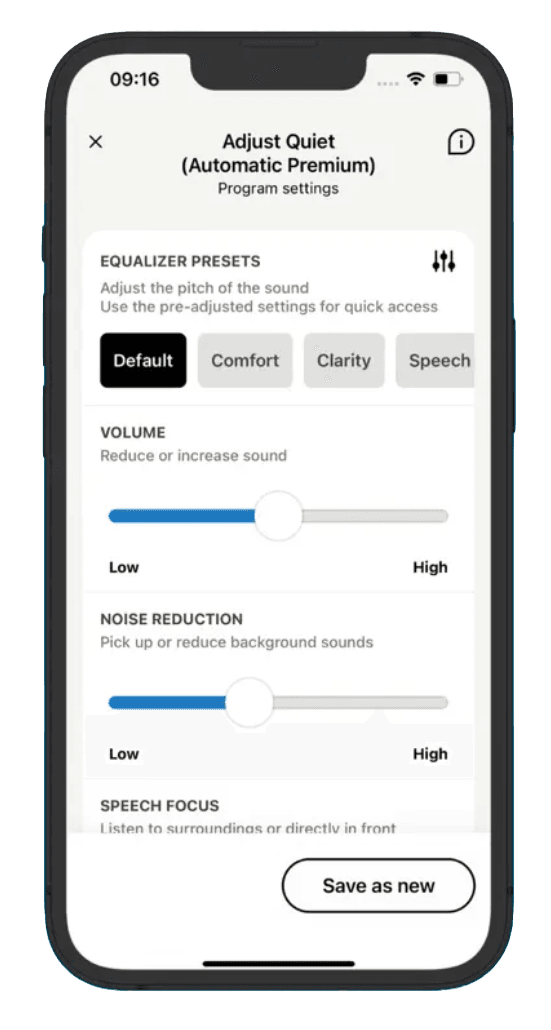
Easy Line Remote
Sonova AG
Formerly Sennheiser Easy Line Remote app
Controls Sennheiser Sonite Rise hearing aids: volume, programs, tone and remote adjustments.
Features
Device companion
- Conditional: Mute hearing devices12
- Conditional: Directional focus control13
- Conditional: Hearing-device tinnitus controls14
- Conditional: Hearing-device control15
- Conditional: Listening-program selection15
- Conditional: Hearing-device volume15
- Conditional: Device battery status16
- Conditional: Find a hearing device17
- Conditional: Remote professional support18
- Conditional: Remote fitting adjustments18
- Conditional: Personalized hearing programs15
- Conditional: Device-usage tracking19
- Conditional: Media streaming20
- Conditional: Hands-free calls21
- Conditional: Device firmware updates22
Compatibility
- Supported: Required hardwareSennheiser Sonite Rise · Sennheiser Sonite R · Kirkland Signature KS 10.0 · Kirkland Signature KS 9.0 · Kirkland Signature KS 9.0 T · Phonak Brio 5 · Phonak Brio 4 · Phonak Brio 3 · Phonak CROS P (KS 10.0)
Availability & access
Privacy & data
- Conditional: Data storage5Developer cloud
- Conditional: Outside processors6, 7, 8Twilio (WebRTC relay for Remote Support calls) · Xirsys (WebRTC relay for Remote Support calls) · Microsoft Azure (cloud hosting) · Salesforce (customer account database) · Google Analytics (analytics) · Google Firebase (crash analytics, remote configuration, push notifications)
- Conditional: Audio sent off device9
- Supported: Delete account10
- Conditional: Download personal data11
- An account is not needed for hearing-aid control; it is required for the Health section features. Evidence: p.6 Setting up and managing an account with Easy Line Remote.
- Requires compatible Sonova-made hearing aids with Bluetooth (Sennheiser Sonite, Kirkland Signature, Phonak Brio); the app is only offered in countries where those hearing aids are approved for distribution.
- Evidence: p.2 Compatibility information.
- Internet is needed for initial pairing setup, and Remote Support sessions run over the internet; Sonova also states a steady connection is needed for full functionality.
- Applies to account and health data when the user creates an account; Sonova's services are hosted on Microsoft Azure (Netherlands) with Salesforce administering the account database. Evidence: 3. Sharing of personal data.
- Remote Support video calls; relay only, data not stored persistently per Sonova. Evidence: 3. Sharing of personal data.
- Account, health and app service data. Evidence: 3. Sharing of personal data.
- App usage analytics and diagnostics. Evidence: 3. Sharing of personal data.
- Only during a scheduled Remote Support video call with a hearing care professional (app asks for microphone and camera access); no other audio workflow is documented. Evidence: p.25 Troubleshooting: Remote Support session.
- In-app; password confirmation required. Sonova notes hearing-device and accessory information cannot be deleted. Evidence: p.6 Personal details.
- By request to Sonova (data portability right) under applicable law; no in-app export documented. Remote Support data requests go to the hearing care professional. Evidence: 6. Your legal rights.
- Requires compatible hearing devices and a supported phone. Functions vary with model, firmware and professional configuration.
- Speech focus slider within Adjust program; availability depends on hearing-aid model and programming. Evidence: p.10 Home: Remote Control advanced settings.
- Only when the hearing aids support tinnitus functionality and the hearing care professional has set it up; varies by model and programming. Evidence: p.12 Home: Remote Control view — non-standard feature.
- Easy Line Remote version 6: compatible Sennheiser hearing aids, with additional functions dependent on model; archived guide is not proof of current app availability.
- Rechargeable hearing aids only. Evidence: p.13 Home: Remote Control view — non-standard feature.
- Documented for Sennheiser Sonite Rise hearing aids.
- Remote adjustments require compatible hearing aids and a participating hearing-care professional; availability varies by market and device.
- Health section wearing time (with time per sound environment) requires an Easy Line Remote account and specific hearing aids (store listing names KS 10.0 and Brio 5). Evidence: p.29 Health detailed feature views.
- Streaming is a hearing-aid Bluetooth function; pairing with the app enables it automatically on Sonite Rise, while Sonite R needs an additional Bluetooth pairing step.
- Hearing-aid Bluetooth Classic HFP function on Sennheiser hearing aids; set up automatically via app pairing on Sonite Rise, separately on Sonite R.
- When an update is available for the paired hearing aids; hearing-aid and phone batteries must be charged to at least 30%. Evidence: p.19-20 Updates.
- With compatible hearing aids; Remote Support is by appointment with a hearing care professional.
- Sonite Rise: enabled automatically on app pairing; Sonite R: extra Bluetooth pairing step.
App Store ratings & reviews
Praise
- Some reviewers describe reliable basic volume and program controls on their setup.
Complaints
- Other reviewers report slow reconnection, interrupted streaming or conflicting phone and hearing-aid connections.
Google Play ratings & reviews
Praise
- Some users find adjustments, custom programs and remote support useful.
Complaints
- Connection failures and settings or modes changing unexpectedly recur.
- Mute, accessory controls and duplicate program entries concern some users.
Hearing devices
Includes documented compatible products and models linked in our catalog. Features can depend on your model, phone and firmware; check the compatibility information for any restrictions.
9 models & families
- Kirkland Signature KS 10.0
- Kirkland Signature KS 9.0
- Kirkland Signature KS 9.0 T
- Phonak Brio 3
- Phonak Brio 4
- Phonak Brio 5
- Phonak CROS P (KS 10.0)
- Sennheiser Sonite R
- Sennheiser Sonite Rise